
pytorch识别图片之001 下载图片显示图片类
AI
import ssl
ssl._create_default_https_context = ssl._create_unverified_context

from matplotlib import pyplot as plt
import numpy as np
import torch

#设置张量打印格式(显示更简洁)
torch.set_printoptions(edgeitems=2,linewidth=75)
#固定随机种子,确保结果可重现
torch.manual_seed(123)

from torchvision import datasets

data_path = '/Volumes/c/work/aigc'
#训练集(50,000张图像
cifar10 = datasets.CIFAR10(root=data_path,train=True,download=True)
#测试集(10,000张图像)
cifar10_val = datasets.CIFAR10(root=data_path,train=False,download=True)

class_names= ['airplane','automobile','bird','cat','deer','dog','frog','horse','ship','truck']
#创建8英寸宽、3英寸高的图形
fig = plt.figure(figsize=(8,3))
for i in range(len(class_names)):
    #add_subplot(2, 5, 1+i):创建2行5列的子图网格
    # 2行:每行5个图,共10个图
    # 5列:每个类别占一列
    # 1+i:当前子图的位置索引(从1开始)
    # xticks=[], yticks=[]:隐藏坐标轴刻度,使图像更干净


    ax = fig.add_subplot(2,5,1+i,xticks=[],yticks=[])
    #设置子图标题为当前类别名称
    ax.set_title(class_names[i])
    # 生成器表达式:遍历cifar10数据集中的所有(img, label)
    # 对
    # 条件label == i:只选择标签等于当前类别i的图像
    # next()
    # 函数:返回第一个满足条件的图像
    # 这样每个类别只取一张示例图像
    img = next(img for img,label in cifar10 if label==i)
    plt.imshow(img)
plt.show()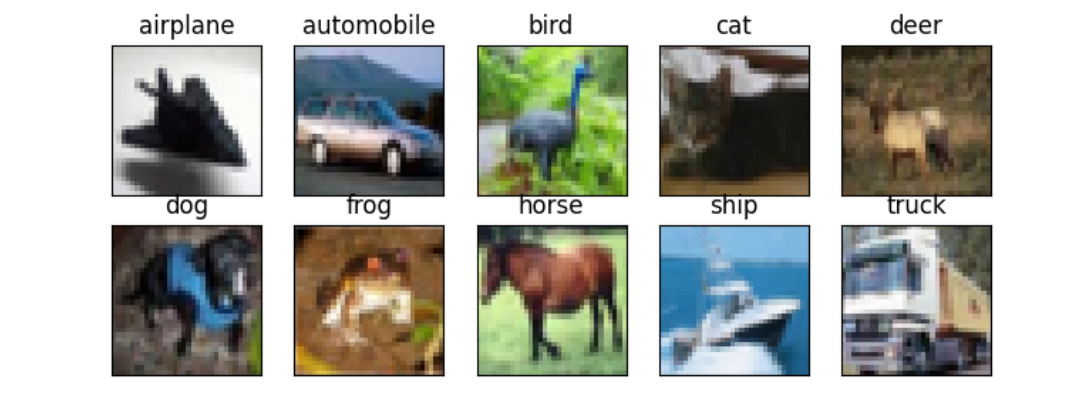
[衡天云]爆款云服务器 低至12元/月
![[衡天云]爆款云服务器 低至12元/月](/hty.png)