 正版资源
AI agent 大模型实战之 智能体创建Vue项目
这门课解决什么问题 市面上大模型应用大多停留在"对话问答"层面,真正的工程价值在于让模型能调用工具、执行操作、与真实环境交互。这门课围绕一个核心命题展开:如何用 MCP(Model Context Protocol)把大模型从"只会说话"变成"能动手做事",并以 Vue 前端为载体,把智能体的能力边
这门课解决什么问题
市面上大模型应用大多停留在"对话问答"层面,真正的工程价值在于让模型能调用工具、执行操作、与真实环境交互。这门课围绕一个核心命题展开:如何用 MCP(Model Context Protocol)把大模型从"只会说话"变成"能动手做事",并以 Vue 前端为载体,把智能体的能力边界可视化、可交互地呈现出来。具体而言,它解决的是"模型如何安全地声明并调用外部能力"这一工程问题,让工具注册、权限校验、执行结果回传都有可复用的实现路径,而非每次都从零搭建。
适合什么基础与学习路径
需要具备 Node.js 基础,熟悉 Vue 组件与项目结构,了解 Python 至少能读懂基础代码。不需要有 MCP、FastMCP 的先修知识,课程会从头讲起。如果对大模型 API 的接入方式(OpenAI 兼容接口)有一定了解,学习效率会更高。建议按"MCP 服务端搭建→工具函数注册与签名→Vue 前端对接回传"的顺序推进,每块都覆盖服务端、工具定义、前后端通信三个层面,形成端到端闭环。
学完能独立做什么与资料怎么用
学完能独立搭建一个具备工具调用能力的智能体服务端,前端能展示工具列表、执行状态与结果输出,并完成从模型请求到工具执行再到结果回传的完整链路。可落地场景包括命令执行类智能体、自动化脚本助手、与本地系统对接的 AI 助手原型。源码、教程与可运行示例按模块组织,每个模块配套一个可直接跑通的演示,建议边读代码边对照目录结构动手,遇到 FastMCP 装饰器用法、工具签名定义、前后端通信协议等卡点时回查对应章节即可。资料本身已考虑可复用性,工具注册部分可直接迁移到其他项目。
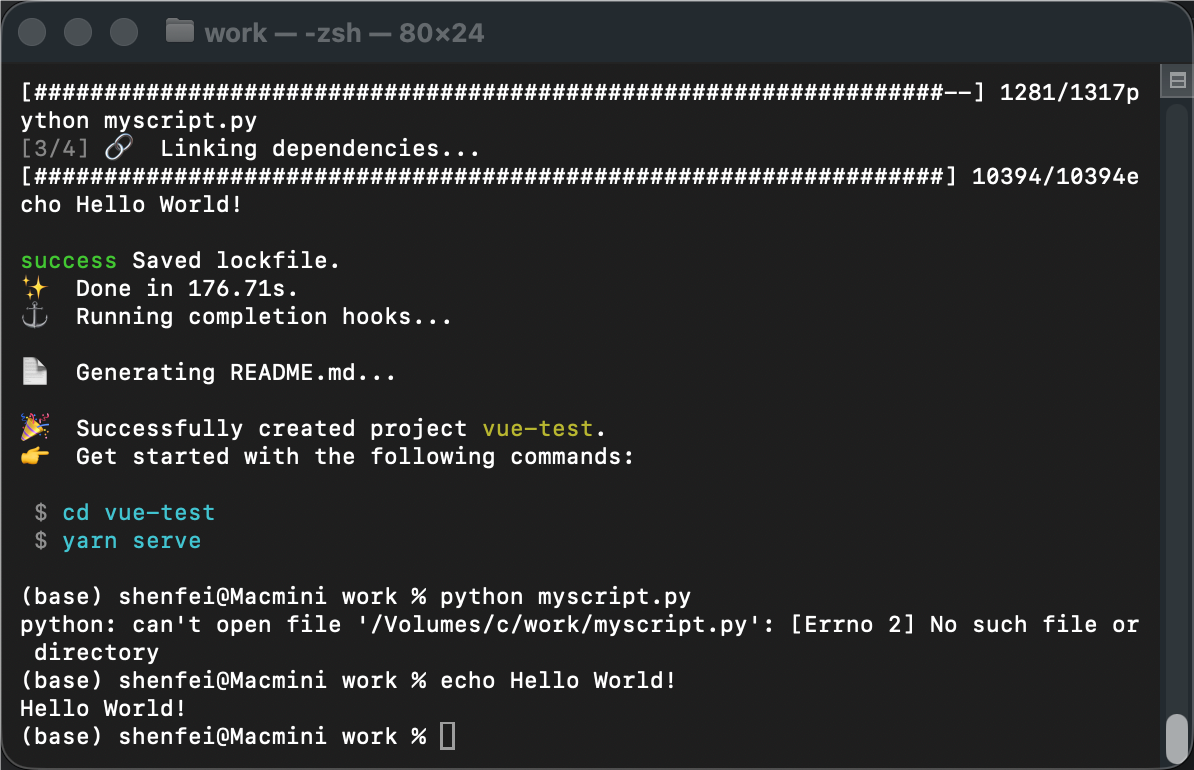
封装tools
import subprocess
from mcp.server.fastmcp import FastMCP
mcp = FastMCP() def run_apple_script(script): p = subprocess.Popen(["osascript","-e",script],stdout=subprocess.PIPE,stderr=subprocess.PIPE) out, err = p.communicate() return out.decode("utf-8").strip(),err.decode("utf-8").strip() @mcp.tool(name="close_terminal",description="关闭终端工具")
def close_terminal(): output,error = run_apple_script(""" tell application "Terminal" to quit """) if error: return error else: return True @mcp.tool(name="open_terminal",description="打开终端工具")
def open_terminal(): output,error = run_apple_script(""" tell application "Terminal" to activate """) if error: return error else: return True @mcp.tool(name="run_script_in_terminal",description="在终端中运行脚本命令")
def run_script_in_terminal(script): print(script) output,error = run_apple_script(f""" tell application "Terminal" activate if (count of windows) > 0 then do script "{script}" in window 1 else do script "{script}" end if end tell """) if error: return error else: return output @mcp.tool(name="get_terminal_full_text",description="查看终端返回的信息")
def get_terminal_full_text(): output,error = run_apple_script(f"""
tell application "Terminal" set fullText to history of selected tab of front window
end tell
""") if error: return error else: return output if __name__=="__main__": mcp.run(transport="stdio")
from mcp_all.utils.tools import create_mcp_stdio_client async def get_stdio_terminal_tools(): params={ "command":"python", "args":[ "/Volumes/c/workspace/ai-agent-test/mcp_all/mcp/terminal_tools.py" ] } client,tools = await create_mcp_stdio_client("terminal_tools",params) return tools调用
async def run_agent(): #memory= FileChatMessageHistory(f"{session_id}.json") memory = MemorySaver() tools = await get_stdio_terminal_tools() agent = create_agent( model=llm, tools=tools, checkpointer=memory, debug=False, ) while True: user_input = input("用户:") if user_input.lower() == "exit" or user_input.lower() == "quit": break resp = await agent.ainvoke( input=({"messages": [{"role": "user", "content":user_input}]}), config={"configurable":{"thread_id":thread_id}} ) print("助理:") print(resp) for chunk in resp: print(chunk,end="") print("\n")运行,在命令行输入 在xxx目录 创建一个vue项目
同类课程
和你正在看的这门一个方向 我的博客
AI agent 大模型实战之 RAG检索本地知识库
永久有效 · 网盘发货
 我的博客
AI agent 大模型实战之 实战langchain集成RAG检索本地知识库
永久有效 · 网盘发货
 我的博客
AI agent 大模型实战之 多伦对话实现
永久有效 · 网盘发货
 我的博客
AI agent 大模型实战之 PythonPerlTool自动编写网站
永久有效 · 网盘发货
 我的博客
AI agent 大模型实战之 基于高德MCP的复杂路径规划+可视化展示
永久有效 · 网盘发货